बिहार में किसी भी जमीन का सबसे ताज़ा सरकारी हिसाब जमाबंदी पंजी में होता है, जिसे रजिस्टर-II भी कहते हैं। इसमें लिखा होता है कि अभी जमीन किस रैयत के नाम पर दर्ज है, उसका खाता और खेसरा क्या है, कितना रकबा है और कितना लगान बकाया है। पहले यह रजिस्टर सिर्फ़ अंचल कार्यालय में राजस्व कर्मचारी के पास रहता था; अब बिहार भूमि पोर्टल पर कोई भी व्यक्ति इसे बिना लॉगिन और बिना शुल्क के देख सकता है। इस गाइड में हम पूरी प्रक्रिया, खोज के सभी तरीके और परिणाम पढ़ने का सही तरीका समझेंगे।
जमाबंदी क्या है और यह क्यों ज़रूरी है?
जब किसी जमीन का दाखिल-खारिज (म्यूटेशन) होता है, तो अंचल में नए मालिक के नाम पर एक खाता खुलता है — यही जमाबंदी है। हर जमाबंदी की एक संख्या होती है और वह रजिस्टर-II के किसी भाग (खंड) और पृष्ठ पर दर्ज रहती है। इसलिए गाँव में लोग अक्सर “भाग वर्तमान–पृष्ठ” बोलकर जमाबंदी की पहचान बताते हैं।
जमाबंदी इसलिए ज़रूरी है क्योंकि:
- लगान (भू-राजस्व) इसी के आधार पर कटता है और रसीद इसी नाम से निकलती है।
- एलपीसी, बैंक ऋण, किसान योजना और मुआवज़े में जमाबंदी का नाम ही देखा जाता है।
- जमीन बेचते समय खरीदार और रजिस्ट्री कार्यालय दोनों जमाबंदी की स्थिति जाँचते हैं।
- किसी विवाद में यह पता चलता है कि रिकॉर्ड में अभी किसका नाम है।
खतियान पुराने सर्वे के समय बना अधिकार-अभिलेख है, जबकि जमाबंदी हर दाखिल-खारिज के बाद अपडेट होने वाला चालू खाता है। यानी खतियान बताता है कि सर्वे के समय जमीन किसकी थी, और जमाबंदी बताती है कि आज किसके नाम पर है। खतियान की जानकारी के लिए हमारी भू-अभिलेख गाइड पढ़ें।
जमाबंदी देखने से पहले ये जानकारी तैयार रखें
- ज़िला और अंचल (प्रखंड स्तर का राजस्व कार्यालय)
- हल्का — कुछ गाँवों का समूह, जो एक राजस्व कर्मचारी देखते हैं
- मौजा — राजस्व गाँव का नाम (कई बार बोलचाल वाले गाँव के नाम से अलग होता है)
- खोज के लिए कोई एक जानकारी: भाग वर्तमान व पृष्ठ, जमाबंदी संख्या, खाता संख्या, खेसरा संख्या या रैयत का नाम
अगर आपको हल्का या मौजा का सही नाम नहीं पता, तो पुरानी लगान रसीद या केवाला देखें — उसमें ये विवरण लिखे होते हैं।
बिहार भूमि जमाबंदी पंजी ऑनलाइन देखने की प्रक्रिया
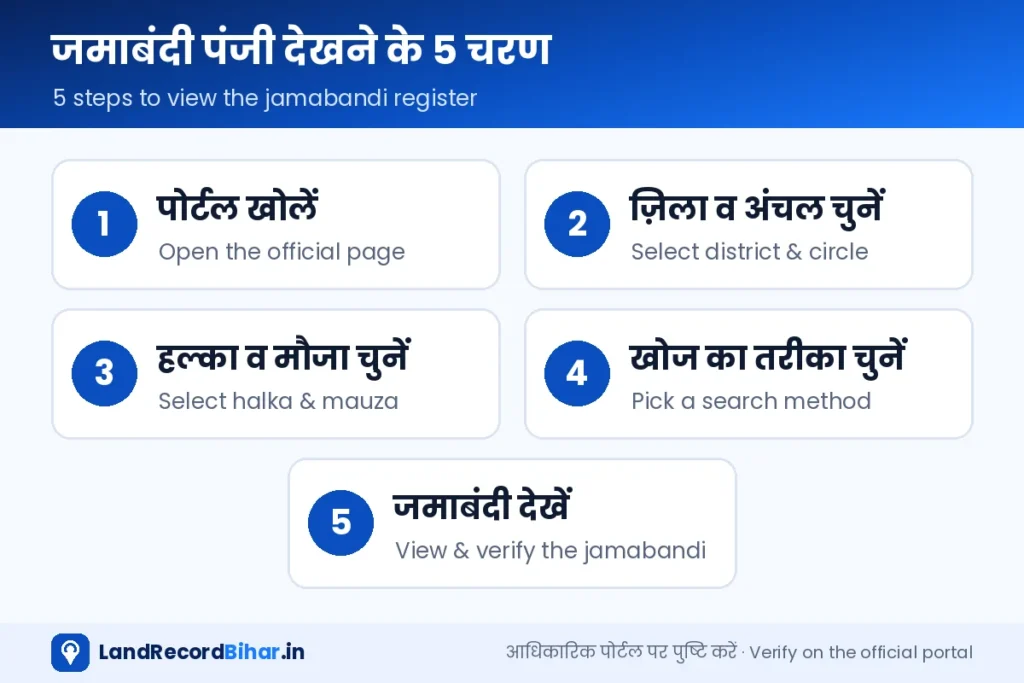
- आधिकारिक पेज खोलें: biharbhumi.bihar.gov.in पर “जमाबंदी पंजी देखें” पर क्लिक करें, या नीचे दिए बटन से सीधे पेज खोलें।
- ज़िला चुनें: सूची से अपना ज़िला चुनें। इसके बाद उस ज़िले के सभी अंचल दिखने लगेंगे।
- अंचल, हल्का और मौजा चुनें: इसी क्रम में चुनें। हर चयन के बाद अगली सूची अपडेट होती है, इसलिए थोड़ा रुककर चुनें।
- खोज का तरीका चुनें: भाग वर्तमान/पृष्ठ, जमाबंदी संख्या, खाता, खेसरा या रैयत का नाम — जो जानकारी आपके पास है, वह विकल्प चुनें और विवरण भरें।
- कैप्चा भरें और खोजें: परिणाम में जमाबंदियों की सूची आएगी। अपने नाम/खाते वाली पंक्ति में “देखें” पर क्लिक करें।
- विवरण जाँचें: रैयत का नाम, पिता/पति का नाम, खाता-खेसरा, रकबा, चौहद्दी, लगान और बकाया ध्यान से मिलाएँ। चाहें तो पेज प्रिंट या PDF में सेव कर लें।
आधिकारिक जमाबंदी पंजी खोलें ↗ डैशबोर्ड पर सेवा देखें
खोज के 5 तरीके — कौन-सा कब इस्तेमाल करें
| खोज का तरीका | कब उपयोगी | सावधानी |
|---|---|---|
| भाग वर्तमान व पृष्ठ | जब लगान रसीद या पुराने कागज़ में भाग-पृष्ठ लिखा हो | सबसे सटीक तरीका |
| जमाबंदी संख्या | जब जमाबंदी नंबर पता हो | मौजा सही चुनें, नंबर हर मौजा में अलग होते हैं |
| खाता संख्या | खतियान या केवाला में खाता लिखा हो | एक खाते की कई जमाबंदियाँ हो सकती हैं |
| खेसरा संख्या | प्लॉट नंबर पता हो (जैसे जमीन खरीदते समय) | एक खेसरा कई लोगों में बँटा हो सकता है |
| रैयत का नाम | कोई नंबर पता न हो | नाम की वर्तनी अलग हो सकती है, नाम का छोटा हिस्सा लिखकर खोजें |
जमाबंदी के परिणाम का हर कॉलम क्या बताता है
- रैयत का नाम / पिता या पति का नाम: जिसके नाम जमीन दर्ज है।
- जमाबंदी संख्या, भाग वर्तमान, पृष्ठ: रजिस्टर-II में खाते की पहचान।
- खाता और खेसरा: किन-किन प्लॉटों पर यह जमाबंदी है।
- रकबा: हर खेसरा का क्षेत्रफल (अक्सर एकड़-डिसमिल में)। बीघा-कट्ठा में बदलने के लिए हमारा माप कन्वर्टर देखें।
- चौहद्दी: उत्तर, दक्षिण, पूरब, पश्चिम की सीमा।
- लगान व सेस, बकाया: सालाना लगान और कितने साल का बकाया है।
ऑनलाइन जमाबंदी का स्क्रीनशॉट केवल जानकारी के लिए है। बैंक, कोर्ट या किसी सरकारी काम के लिए डिजिटल हस्ताक्षरित प्रति (भू-अभिलेख पोर्टल), एलपीसी या अंचल से प्रमाणित प्रति लें।
जमाबंदी न मिले या गलत दिखे तो क्या करें?
1. जमाबंदी दिख ही नहीं रही
पहले जाँचें कि मौजा और हल्का सही चुना है या नहीं। फिर नाम की जगह खाता/खेसरा से खोजें। अगर फिर भी न मिले, तो हो सकता है आपकी जमाबंदी डिजिटाइज़ ही न हुई हो। ऐसे में परिमार्जन प्लस पर “छूटी जमाबंदी का डिजिटाइजेशन” के लिए आवेदन करें।
2. नाम, रकबा या खेसरा गलत है
डिजिटाइजेशन के समय टाइपिंग की गलतियाँ आम हैं। इनके लिए भी परिमार्जन प्लस ही सही रास्ता है। विभाग के अनुसार साधारण त्रुटि 15 कार्य दिवस, तकनीकी त्रुटि 35 और जाँच वाले मामले 75 कार्य दिवस तक में निपटाए जाते हैं।
3. जमीन बिक चुकी है पर नाम पुराने मालिक का है
इसका मतलब है कि दाखिल-खारिज नहीं हुआ है। खरीदार को ऑनलाइन दाखिल-खारिज के लिए आवेदन करना होगा।
धोखाधड़ी से बचने के लिए 3 आदतें
- साल में कम से कम दो बार अपनी जमाबंदी ऑनलाइन देखें।
- जमाबंदी पर SMS अलर्ट सेवा चालू करें, ताकि कोई बदलाव होते ही सूचना मिले।
- अपने मौजा की आम सूचना देखते रहें — किसी ने आपकी जमीन पर दाखिल-खारिज आवेदन किया हो तो समय रहते आपत्ति कर सकें।
अक्सर पूछे जाने वाले प्रश्न
क्या मोबाइल पर जमाबंदी देख सकते हैं?
हाँ। पेज मोबाइल ब्राउज़र में खुलता है। सूची ठीक न दिखे तो ब्राउज़र में “डेस्कटॉप साइट” विकल्प चालू करें।
क्या जमाबंदी देखने का कोई शुल्क है?
नहीं, ऑनलाइन जमाबंदी पंजी देखना पूरी तरह मुफ़्त है।
क्या किसी दूसरे की जमाबंदी देख सकते हैं?
हाँ, यह सार्वजनिक रिकॉर्ड है। इसी वजह से जमीन खरीदने से पहले विक्रेता की जमाबंदी जाँचना आसान है — देखें हमारी जमीन खरीद से पहले जाँच गाइड।
जमाबंदी हिंदी के अलावा दूसरी भाषा में मिलती है?
हाँ, विभाग ने जमाबंदी को 22 भारतीय भाषाओं में देखने की सुविधा भी दी है। यह सुविधा पढ़ने के लिए है; आधिकारिक रिकॉर्ड हिंदी वाला ही है।
निष्कर्ष: जमाबंदी पंजी आपकी जमीन का सबसे ज़रूरी रिकॉर्ड है और अब इसे देखना दो मिनट का काम है। सही मौजा चुनें, भाग-पृष्ठ या खाता-खेसरा से खोजें, और कोई भी गड़बड़ी दिखे तो तुरंत परिमार्जन या दाखिल-खारिज का रास्ता अपनाएँ।
The most current government record of any land in Bihar is the jamabandi register, also called Register-II. It shows whose name the land is in today, its khata and khesra, the area and any pending rent. This register used to sit only with the revenue karmachari at the circle office; now anyone can see it on the Bihar Bhumi portal without login and free of cost. This guide walks through the full process, every search option and how to read the result.
What is a jamabandi and why does it matter?
When a mutation (dakhil-kharij) is approved, the circle opens an account in the new owner’s name — that account is the jamabandi. Each jamabandi has a number and sits on a particular volume (bhag) and page of Register-II, which is why villagers often identify it as “Bhag-Vartaman–page”.
- Land rent is charged against it, and the rent receipt is issued in that name.
- LPCs, bank loans, farmer schemes and compensation all go by the jamabandi name.
- Buyers and the registry office check the jamabandi before a sale.
- In a dispute it shows whose name the record currently carries.
The khatiyan is the record of rights prepared during the old survey; the jamabandi is the live account updated after every mutation. The khatiyan tells you who held the land at survey time; the jamabandi tells you who holds it today. See our Bhu-Abhilekh guide for khatiyans.
Keep this information ready
- District and circle (anchal)
- Halka — a group of villages handled by one revenue karmachari
- Mauza — the revenue village name (sometimes different from the everyday village name)
- Any one search key: Bhag-Vartaman & page, jamabandi number, khata, khesra or raiyat name
Not sure of the halka or mauza? Check an old rent receipt or the sale deed — both mention them.
How to view the jamabandi register online
- Open the official page: click “View Jamabandi Register” on biharbhumi.bihar.gov.in, or use the button below.
- Select the district: the circles of that district then load.
- Select circle, halka and mauza: in that order — each list refreshes after the previous choice, so wait a moment.
- Choose a search method: Bhag-Vartaman/page, jamabandi number, khata, khesra or raiyat name, then enter the value.
- Fill the captcha and search: a list of jamabandis appears; click “View” on your row.
- Verify the details: raiyat and father’s/husband’s name, khata-khesra, area, boundaries, rent and dues. Print or save as PDF if needed.
Open official jamabandi register ↗ See it on the dashboard
Five ways to search — and when to use each
| Search by | Best when | Watch out |
|---|---|---|
| Bhag-Vartaman & page | A rent receipt or old paper shows volume/page | Most precise method |
| Jamabandi number | You know the number | Pick the right mauza — numbers repeat across mauzas |
| Khata number | The khatiyan or deed shows the khata | One khata may have several jamabandis |
| Khesra number | You know the plot number (e.g. when buying) | A khesra may be split among several people |
| Raiyat name | You know no number | Spellings vary — search with part of the name |
What each column in the result means
- Raiyat / father’s or husband’s name: the recorded holder.
- Jamabandi no., Bhag-Vartaman, page: the account’s identity in Register-II.
- Khata and khesra: which plots the jamabandi covers.
- Area (rakba): usually in acre-decimal; convert to bigha-katha with our unit converter.
- Boundaries (chauhaddi): north, south, east and west.
- Rent, cess and dues: annual rent and how many years are pending.
Use the online jamabandi for information only. For bank, court or government work get a digitally signed copy (Bhu-Abhilekh), an LPC or a certified copy from the circle.
Jamabandi missing or wrong?
1. It doesn’t show up
Re-check the mauza and halka, then search by khata/khesra instead of name. If it still doesn’t appear, it may never have been digitised — apply on Parimarjan Plus for digitisation of a missing jamabandi.
2. Name, area or khesra is wrong
Typing errors from bulk digitisation are common; Parimarjan Plus fixes them too. As per the department, clerical errors are resolved within 15, technical errors within 35 and inquiry cases within 75 working days.
3. Land was sold but the old owner’s name remains
The mutation hasn’t happened. The buyer must apply for online dakhil-kharij.
Three habits that prevent fraud
- Check your jamabandi online at least twice a year.
- Turn on SMS alerts on your jamabandi so any change notifies you.
- Watch your mauza’s public notices so you can object in time if someone files a mutation on your land.
FAQs
Can I view the jamabandi on my phone?
Yes. If the list looks cramped, switch your browser to “desktop site”.
Is there a fee?
No, viewing the online jamabandi register is free.
Can I see someone else’s jamabandi?
Yes, it is a public record — which makes checking a seller easy. See our pre-purchase checklist.
Is it available in other languages?
Yes, the department offers jamabandi viewing in 22 Indian languages for reading convenience; the Hindi record remains official.
Bottom line: the jamabandi is your land’s most important record, and viewing it now takes two minutes. Pick the right mauza, search by volume-page or khata-khesra, and if anything looks wrong, take the Parimarjan or mutation route right away.
टिप्पणियाँComments (1)